YouTube End Screens: Build the Stage the Tiles Land On
YouTube end screens run in a video's last 5 to 20 seconds, with up to 4 tiles. Grow the outro out of your last shot, leave a space per tile, then hold still.
The clickable tiles at the end of a YouTube video aren't part of your video. YouTube draws them on top of it, in the last few seconds of anything 25 seconds or longer. The part you make is the stage under them.
A good stage does three things. It grows out of the video so nobody feels the ending, it leaves a deliberate space for each tile and brings them in one at a time, and then it goes still underneath them. It also has to look finished where the tiles never show up. The woodworking outro at the top of the page does all of it in 22 seconds.
The end screen at the top of the page, from one prompt. Made with FrameCall.
Show the prompt
Prompt: "This is the last 22 seconds of every video on my woodworking channel, Quiet Workshop, and YouTube's end screen will put two clickable tiles on top of it: a video on the right and a round subscribe button on the left. I want it to feel like the video hasn't ended, it has just stepped back. Open close on a finished walnut stool on a workbench in late afternoon light, sun coming through a window, dust floating in the beam, the grain, the shavings and the scuffed bench drawn with real texture. Over the first few seconds the camera slowly pulls back and the workshop arranges itself into the end screen: the window frame becomes the empty 16:9 space for the next video on the right, about two fifths of the frame wide, its glass glowing softly; a round knot in the bench top lifts and becomes the round space for the subscribe button on the left; and 'Thanks for watching' is traced above it like a pencil line on wood before it settles into a warm serif, with 'A new build every Friday' small underneath. The window arrives first and the knot a couple of seconds later, so the two buttons can appear one at a time. Then everything that matters holds completely still for the rest of the piece: nothing moves inside or across the two spaces, and only the dust in the light and a very slow shift of the sun keep the frame alive. The two spaces should look like quiet parts of the room, so the frame still looks finished on a phone where the buttons never show. Walnut, cream and a soft amber. No corner text, no glow, no lens flares."
Grow the end screen out of your last shot
The usual end screen is a hard cut to a flat card that says "Thanks for watching". That cut tells the viewer the video is over, and a viewer who thinks it's over reaches for the next thing on their own feed instead of the one you picked. Keep the last shot going and let it turn into the layout.
Here the camera opens close on the finished walnut stool and dust in the window light, then pulls back. The window shrinks and squares off into the space for the next video, and a dark knot in the bench top lifts off the wood as a round disc and rises to the wall, where the subscribe button will go. Nothing new arrives from outside the room, so it still feels like the workshop and not like a template laid over it.
Find the same thing in your own last shot: a screen, a frame, a plate, a page. The end screen should be built from what the viewer was already looking at, the way a title card builds its exit into the next card's entrance.
Give every tile a space that looks deliberate
YouTube's tiles cover whatever is under them, so anything animated there is wasted, and text there is hidden. Decide the tiles before anything moves and write them into the prompt: how many, what kind, and roughly where. A video tile takes about a third of the frame's width, a subscribe button is a circle, and each one can be resized in YouTube Studio to fill the space you left for it.
Show the prompt
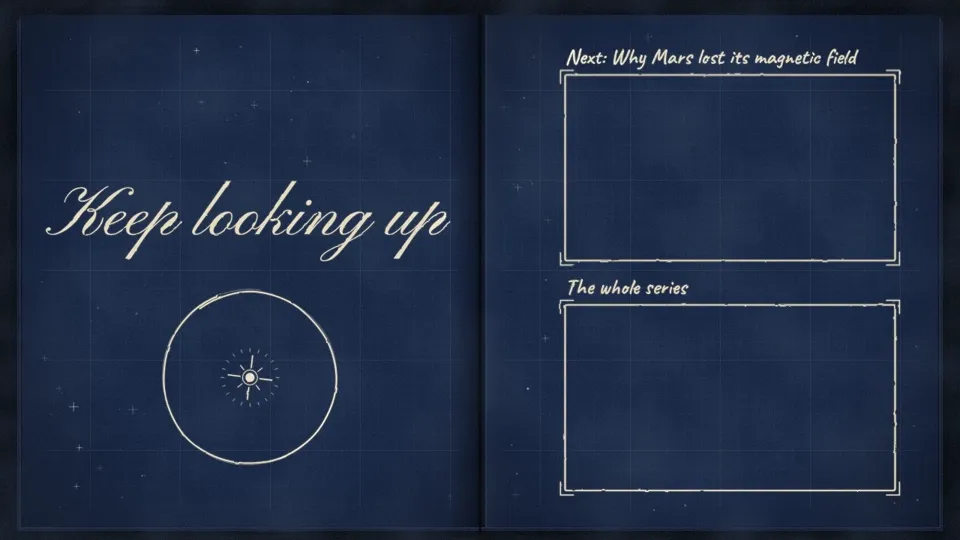
Prompt: "End screen for my astronomy channel, Small Orbits, 20 seconds, 16:9. YouTube will put three clickable tiles on top of it, two videos stacked on the right and a round subscribe button on the left, so those three spaces have to stay empty. Start where my videos end, on a hand-drawn diagram of a planet circling its star, like a page from an old observatory notebook: deep navy paper, cream ink lines that slightly bleed, a faint graph grid, pencil notes and measurements in the margins. The camera pulls out to show the whole notebook spread, and the diagram turns into the end screen: the planet's orbit tightens into the circle where the subscribe button will sit, the star still glowing faintly at its center, and two sketched star charts slide across to the right and square up into two empty 16:9 frames, one above the other, each with a small handwritten label just above its frame, 'Next: Why Mars lost its magnetic field' and 'The whole series'. 'Keep looking up' writes itself in large ink lettering on the left, above the circle. The three spaces arrive one after another, a second or two apart. After that the words and the three frames never move again, and the only life left is faint stars twinkling across the page and the ink catching the light. Make it look hand-inked and beautiful, like a real illustrator drew it. No corner text, no glowing effects."
This one starts on a page of an observatory notebook, a hand-inked orbit with its foci and margin notes. The notes fade, the ellipse rounds into the circle for the subscribe button with the star still at its center, and two star charts on the facing page square up into two empty video frames. Every space reads as part of the drawing, so it looks designed even before a tile lands on it.
Notice where the words go. "Next: Why Mars lost its magnetic field" sits just above its frame, not inside it, so the label stays visible once the tile covers the frame. Put any text that names a tile beside it, never under it.
Bring the tiles in one at a time, then go still
End screen elements all appear at once by default, which hands the viewer four choices in the same instant. Stagger them instead: the video first, because that's the click you want most, and the subscribe button a couple of seconds later. Animate each space arriving in that order, then set each element's start time in Studio to the moment its space has finished drawing.
Once the last space is in, stop moving anything that matters. "Thanks for watching" is traced like a pencil line and settles into a serif, and from there the window, the disc and the words stay put. Only the dust drifts and the sunlight shifts slowly, which keeps the frame alive without pulling the eye away from the tiles. Any slow background works the same way, as long as nothing in it crosses a tile.
Make it read with the tiles missing
End screen elements don't show everywhere. YouTube skips them on mobile web, in YouTube Kids and YouTube Music, and on videos made for kids, and any viewer can hide them. Those people see your stage with nothing on it.
On a TV or desktop
With the tiles missing
That's why both end screens on this page draw their spaces as parts of the scene, a window and a carved disc, a circle around a star and two inked frames, instead of dashed boxes that say "video here". Without the tiles the frame still looks like a finished closing shot. Keep the channel name or the sign-off line outside the spaces too, so it's the last thing everyone reads.
Make an end screen from a prompt
In FrameCall you describe it in the prompt box: what your last shot looks like, how many tiles and where, what each space is made from, the order they arrive in, and that everything holds still afterward. Send a follow-up to move a space or change the timing.
Then export the MP4, join it to the end of your video in your editor, and add the elements in YouTube Studio (Content, the video, Editor, End screen). The prompt guide has more to start from, and the guide to making motion graphics without After Effects follows one video from the first message to export.
New accounts get 100 free credits with no card, and a new video on the Quality tier, which made both end screens here, typically costs $1 to $2.50 in credits.
A channel intro is the same craft at the other end of the video, usually a short logo reveal, and the habit of growing every scene out of the last one is what makes animated video ads work too. If you'd rather keyframe it yourself, start with the After Effects alternatives or the guide to motion graphics software.
FAQ
How long are YouTube end screens?
End screen elements can run over the last 5 to 20 seconds of a video, and only on a video that is at least 25 seconds long. They end when the video ends, so an animated end screen never needs to be longer than 20 seconds.
How many elements can a YouTube end screen have?
Up to four on a 16:9 video: videos or playlists, a subscribe button, another channel, and a link if you're in the YouTube Partner Program. Each one can start at its own time.
Why can't I add an end screen to my video?
Usually because the video is shorter than 25 seconds, or because it's set as made for kids, which turns end screens off. Check the length first.
How long should a YouTube intro be?
Keep the branded part to about 5 seconds or less and get to your first point well inside 30 seconds, the span YouTube's retention report treats as the intro. Add seconds to an intro only when you add something worth reading.
Make your first animation free
Describe what you want in plain English and watch FrameCall build it. No After Effects, no timelines, no credit card.
100 free credits • No subscription • Credits never expire