Animated Video Ads: Make the Motion Do the Selling
An animated ad has to sell before the viewer scrolls or skips at 5 seconds. Show the change first, grow each scene from the last, hold the end card.
An animated video ad has to make its case before the viewer scrolls on, and on YouTube the skip button appears after 5 seconds. So the motion has to make the argument: show the product changing something in the first beat, grow every scene out of the one before so there's never a cut to leave at, and land the name on a card that stays still long enough to read.
The ad at the top of the page does all three in 25 seconds, for a pair of earbuds called Hush, with no sound at all. The last section adds what every placement asks for on top of that: a canvas of its own.
The ad at the top of the page, from one prompt. Company, product and numbers invented. Made with FrameCall.
Show the prompt
Prompt: "Make a 25-second launch ad for Hush, our new noise-cancelling earbuds, that works with the sound off. Open in chaos: the frame is crammed with the words of a loud city, HONK, DRILL, SIREN, "is this seat taken?", a ringing phone, set in clashing type that jitters and overlaps on a grey street-poster texture. Within the first two seconds a single white earbud drops into the middle and a soft ring of silence spreads out from it: every word the ring touches loses its color and sinks away letter by letter, until the frame is calm and pale and holds only the earbud, with the name "Hush" settling beside it. That change is the whole pitch, so it has to read instantly. After that the ad never cuts, and each scene grows out of the last: the ring of silence becomes a battery ring that fills while "40 hours" counts up inside it, the ring folds down into the lid of the charging case, the case opens and the earbuds glide in, then the case turns and its edge becomes a thin line that draws a skyline of the same city, quiet now, with small lit windows and the line "The city keeps talking. You don't have to listen." End on a card with the earbud, "Hush" and "hush.audio", completely still for the last four seconds so it can be read. Draw the earbuds and the case carefully in soft white with believable highlights and shadows, like a product render. Off-white and graphite with one coral accent, a confident grotesque for the name and a calm serif for the line. No corner HUD text, no glow, no lens flares, no camera shake."
Show the change in the first two seconds
Most feed ads start muted and mid-scroll, so the opening can't be a logo, a slow fade or a question. It has to be the before and the after, happening. Hush opens on a frame crammed with the words of a loud city, HONK, DRILL, SIREN and "your call is important to us" in clashing poster type. An earbud drops into the middle, a pale ring spreads out from it, and every word the ring passes drains of color and sinks away.
Nobody needs to read a single word to get it: noise, then quiet, caused by the product. The name settles beside the earbud as soon as the frame is calm, so a viewer who leaves at three seconds still knows what was sold. Find the equivalent for your product. A restoration service shows the stain clearing, a budgeting app shows money appearing, a cleaning spray shows a grey counter coming up white. Whatever the change is, it goes first.
Grow every scene out of the last
A hard cut between unrelated scenes is a door out of the ad. It resets the viewer's attention, and a reset is when people scroll. Hush never cuts. The ring of silence becomes a battery ring that fills while "40 hours" counts up inside it, the empty ring gives way to the charging case, the case opens for the buds and closes again, and its edge stretches into a line that draws the same city's skyline, quiet now, under "The city keeps talking. You don't have to listen."
Each scene carries one idea, and something on screen always crosses over into the next. The ring stays a plain circle from the opening to the battery, so the eye follows it, and the battery claim and the skyline read as consequences of the opening instead of a list of features. One accent color helps the same way: coral is the only warm thing on screen, so it always marks where to look.
Make the numbers move, then hold the name
When the product's promise is a number, animate the number arriving instead of stating it. This vertical ad for a savings app opens on a receipt, "Oat latte $4.35", whose total rolls up to $5.00 while a 65¢ coin pops off and falls into a jar. Then the receipts speed up, a bus fare, a paperback, a taxi, a gym pass, each one flicking its coin in while a counter runs month by month to $1,148.
Show the prompt
Prompt: "Vertical ad, about 20 seconds, for Roundup, our app that rounds every card purchase up to the next dollar and saves the change. It will run on Reels and TikTok, mostly with the sound off, so the first second has to stop the thumb: a paper receipt slides up the middle of the screen, "Oat latte $4.35", the 4.35 rolls up to 5.00 like an odometer, and a 65¢ coin pops off the top and falls. Follow that coin into a glass jar, and then the receipts come faster and faster, a bus fare, groceries, a paperback, a taxi, each one rounding up and flicking its coin into the jar, which fills in a satisfying stack while a counter above it runs through the months from January to December and lands on "$1,148 saved without thinking about it". Then the jar tips forward and pours its coins into a phone showing the Roundup screen with that total, and it ends on a still card, "Roundup" over "Spare change, on purpose" with "Get the app" under it, held for about three seconds. Keep every word in the middle of the screen, well away from the top and the bottom where the app's buttons and captions sit. Warm paper texture, deep green and cream with one bright yellow for the coins, chunky friendly type, and figures that don't jitter as they count. Every scene should flow out of the one before it, never a hard cut."
By the time $1,148 lands, the viewer has watched it being saved, which is far more convincing than reading it. The jar then pours into a phone showing the app with the same total, and the ad ends on a cream card, "Roundup" over "Spare change, on purpose" and a button, that doesn't move for its last few seconds. Give the end card the reading time a title card gets, about 2 seconds plus 1 for every 3 words, and keep every word on it still.
This one saves its name for the end, which suits a feed where the story itself holds people. On a skippable YouTube ad, where the viewer can leave after 5 seconds, put the name in the opening the way Hush does.
Lay out each placement's canvas on its own
Each placement wants its own canvas: 9:16 for Reels, Stories and TikTok, 4:5 for Facebook Feed, 16:9 for YouTube in-stream. Cropping one master doesn't work, because a 16:9 frame cut to 9:16 keeps only 32% of its width. Here is a 15-second ad for FixFade, a photo restoration site, sent once at each canvas with the same words and the same two photos.
Show the prompt
Prompt: "I need a 15-second ad for FixFade (fixfade.com), my photo restoration site, using two attached photos: wedding-before.jpg is a 1940s wedding photo with a water stain, and wedding-after.jpg is the same photo restored and colorized. Start on the stained photo, big in the frame, with "That photo you almost put away" for the first 3 seconds. From 3 to 10 seconds a thin bright line sweeps across it, and behind the line the stain clears and the color returns, with "See them the way you remember them" on screen while it goes. Hold the restored photo until 12 seconds, then an end card for the last 3 seconds: "Originals never altered" over "fixfade.com". Cream #FAF6EF background, dark brown #201810 text, one burnt orange #B85511 accent, a serif for the headlines, and nothing flashing or shaking."
Each version is composed for its frame: the photo beside the headline in 16:9, the headline stacked above the photo in 9:16, the photo filling most of the 4:5 frame. Cropped to 9:16, the 16:9 version keeps the groom's arm and half of each headline line.
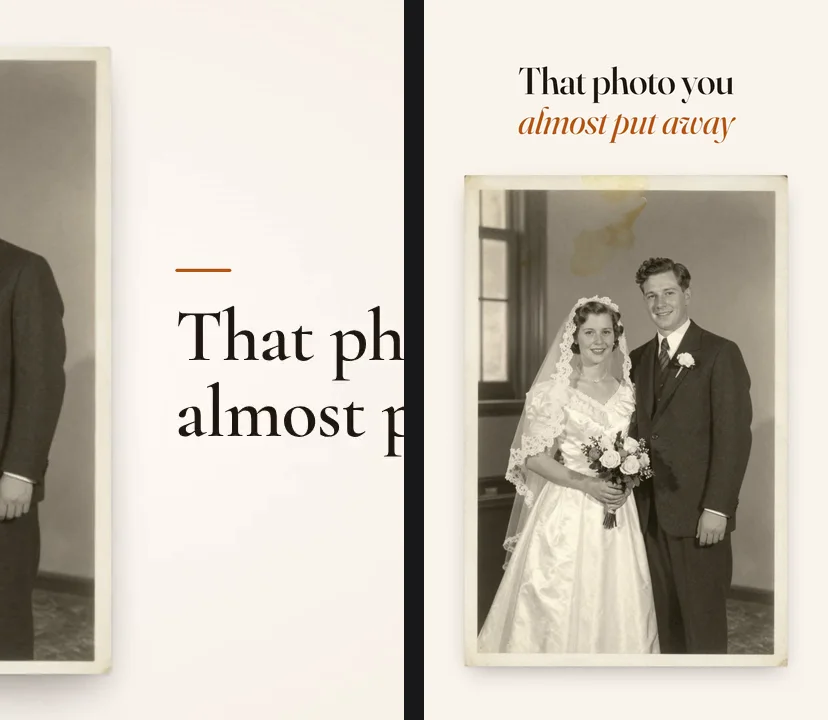
Vertical placements also cover part of the frame. For Reels and Stories, Meta's Reels ad specs suggest leaving roughly 14% of the top, 35% of the bottom and 6% of each side free of text and logos, where the app puts its buttons and captions. That's why the savings ad keeps every receipt, number and word in the middle of the screen. Say so in the prompt, and say it for the product too if it has to stay clear.
Make an animated ad from a prompt
In FrameCall, pick the canvas, attach your product photos if you have them, and describe the ad: the change that opens it, how each scene grows into the next, the exact words in quotes, your colors, and that the end card holds still. Send it once per canvas so each one is laid out from scratch, and send a follow-up to change anything. The prompt guide has more to start from, and the walkthrough of making motion graphics without After Effects follows one video from the first message to export.
New accounts get 100 free credits with no card, and free exports are 720p with a framecall.com watermark. A new video on the Quality tier, which made every ad here, typically costs $1 to $2.50 in credits.
FrameCall exports MP4 only, and uploading, targeting and testing happen in the ad platform. If you'd rather keyframe it yourself, the After Effects alternatives compare the timeline tools.
FAQ
How long should an animated video ad be?
15 seconds suits most placements. Google recommends 15 to 20 seconds for skippable YouTube in-stream ads, and Instagram Stories plays an ad under 16 seconds in full. A YouTube bumper is its own 6-second cut that viewers can't skip.
Do animated ads need sound?
They need to work without it, because most feed ads start muted, so the story has to read from the picture and the words on screen. Sound is still a plus where people turn it on: Meta calls it optional but strongly recommended for Reels ads.
How much does an animated video ad cost?
Animation studios quote per finished minute, from about $1,500 for simple motion graphics to $10,000 and more for 2D, and they set their own minimums, so a 15-second ad doesn't cost a quarter of that. With FrameCall a new video on the Quality tier typically costs $1 to $2.50 in credits.
Can FrameCall make GIF or HTML5 banner ads?
No. FrameCall exports MP4 (H.264), which Meta, TikTok, LinkedIn and YouTube all take. A display banner that has to be a GIF or an HTML5 package needs another tool.
Make your first animation free
Describe what you want in plain English and watch FrameCall build it. No After Effects, no timelines, no credit card.
100 free credits • No subscription • Credits never expire